agentica
快速入门
本指南帮助你在几分钟内安装 Agentica 并运行第一个 AI 智能体。
环境要求
- Python >= 3.12
- 至少一个 LLM 提供商的 API Key
安装
pip install -U agentica
从源码安装(开发模式):
git clone https://github.com/shibing624/agentica.git
cd agentica
pip install -e .
配置 API Key
在 ~/.agentica/.env 中配置,或直接设置环境变量:
# 推荐:智谱AI(glm-4.7-flash 免费,支持工具调用,128k 上下文)
export ZHIPUAI_API_KEY="your-api-key"

# OpenAI
export OPENAI_API_KEY="sk-xxx"

# DeepSeek
export DEEPSEEK_API_KEY="your-api-key"

# Anthropic (Claude)
export ANTHROPIC_API_KEY="your-api-key"
第一个 Agent
import asyncio
from agentica import Agent, ZhipuAI

async def main():
    agent = Agent(model=ZhipuAI())
    result = await agent.run("一句话介绍北京")
    print(result.content)

asyncio.run(main())
输出:
北京是中国的首都,是一座拥有三千多年历史的文化名城,也是全国的政治、文化和国际交流中心。
同步调用
如果你不需要 async,可以使用同步适配器:
from agentica import Agent, OpenAIChat

agent = Agent(model=OpenAIChat(id="gpt-4o-mini"))
result = agent.run_sync("什么是量子计算?")
print(result.content)
流式输出
异步流式(推荐)
import asyncio
from agentica import Agent, OpenAIChat

async def main():
    agent = Agent(model=OpenAIChat(id="gpt-4o-mini"))
    async for chunk in agent.run_stream("写一首关于春天的诗"):
        if chunk.content:
            print(chunk.content, end="", flush=True)
    print()

asyncio.run(main())
同步流式
from agentica import Agent, OpenAIChat

agent = Agent(model=OpenAIChat(id="gpt-4o-mini"))
for chunk in agent.run_stream_sync("写一首关于春天的诗"):
    if chunk.content:
        print(chunk.content, end="", flush=True)
print()
使用工具
给 Agent 配备工具,让它能执行实际操作:
import asyncio
from agentica import Agent, OpenAIChat, BaiduSearchTool

async def main():
    agent = Agent(
        model=OpenAIChat(id="gpt-4o"),
        tools=[BaiduSearchTool()],
        instructions=["使用搜索工具获取最新信息,用中文回答"],
    )
    result = await agent.run("今天的科技新闻有哪些?")
    print(result.content)

asyncio.run(main())
结构化输出
使用 Pydantic 模型获取结构化数据:
import asyncio
from pydantic import BaseModel, Field
from agentica import Agent, OpenAIChat

class CityInfo(BaseModel):
    name: str = Field(description="城市名称")
    country: str = Field(description="所属国家")
    population: str = Field(description="人口")
    highlights: list[str] = Field(description="主要特色")

async def main():
    agent = Agent(
        model=OpenAIChat(id="gpt-4o-mini"),
        response_model=CityInfo,
    )
    result = await agent.run("介绍北京")
    city: CityInfo = result.content
    print(f"{city.name} ({city.country})")
    print(f"人口: {city.population}")
    for h in city.highlights:
        print(f"  - {h}")

asyncio.run(main())
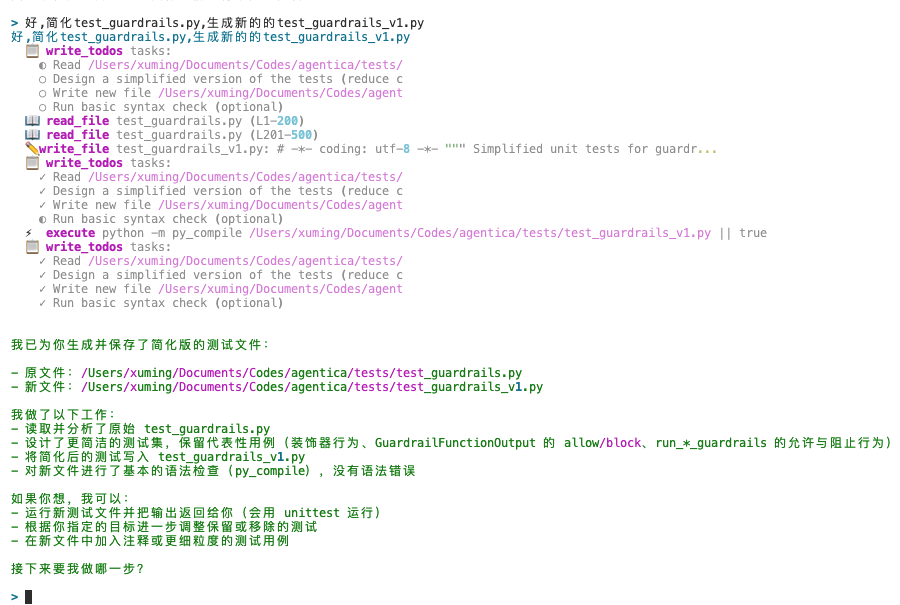
CLI 交互模式
安装后可直接在终端使用:
# 交互模式
agentica

# 单次查询
agentica --query "解释什么是 RAG"

# 指定模型
agentica --model_provider zhipuai --model_name glm-4.7-flash

# 启用工具
agentica --tools baidu_search shell
选择模型
Agentica 支持 20+ 模型提供商,详见 模型提供商指南:
from agentica import (
    OpenAIChat,       # GPT-4o, GPT-4o-mini
    DeepSeek,         # deepseek-chat, deepseek-reasoner
    ZhipuAI,          # glm-4.7-flash (免费)
    Claude,           # claude-sonnet-4-20250514
    Qwen,             # qwen-plus, qwen-turbo
    Moonshot,         # moonshot-v1-128k
    Doubao,           # doubao-pro-32k
    Ollama,           # 本地模型
    # ...更多
)

# 使用不同模型
agent = Agent(model=DeepSeek(id="deepseek-chat"))
agent = Agent(model=ZhipuAI(id="glm-4.7-flash"))
agent = Agent(model=Ollama(id="llama3.1"))
下一步
- Agent 核心概念 — 深入理解 Agent 的组成
- Team & Workflow — 多智能体协作
- 工具系统 — 内置工具与自定义工具
- MCP 集成 — Model Context Protocol
- 模型提供商 — 全部模型配置
- CLI 终端指南 — CLI 完整功能
- 最佳实践 — 设计原则与生产部署
- API 参考 — 完整 API 文档